Query with SPARQL
POST /sparql takes a JSON body and returns the variable bindings. Every query on this page was run against the demo (a synthetic dairy cooperative), and the results quoted are what it returned.
curl -X POST "$URL/sparql" \ -H "Authorization: Bearer $TOKEN" -H "Content-Type: application/json" \ -d '{"query": "SELECT ?class (COUNT(?s) AS ?n) WHERE { GRAPH ?g { ?s a ?class } } GROUP BY ?class ORDER BY DESC(?n)"}'The answer has variables, rows, and fields that say how the query ran (factsScanned, truncated, plan, asOf). Terms come back in RDF form: IRIs in angle brackets, and typed literals such as "40"^^<http://www.w3.org/2001/XMLSchema#integer>.
Named graphs
Section titled “Named graphs”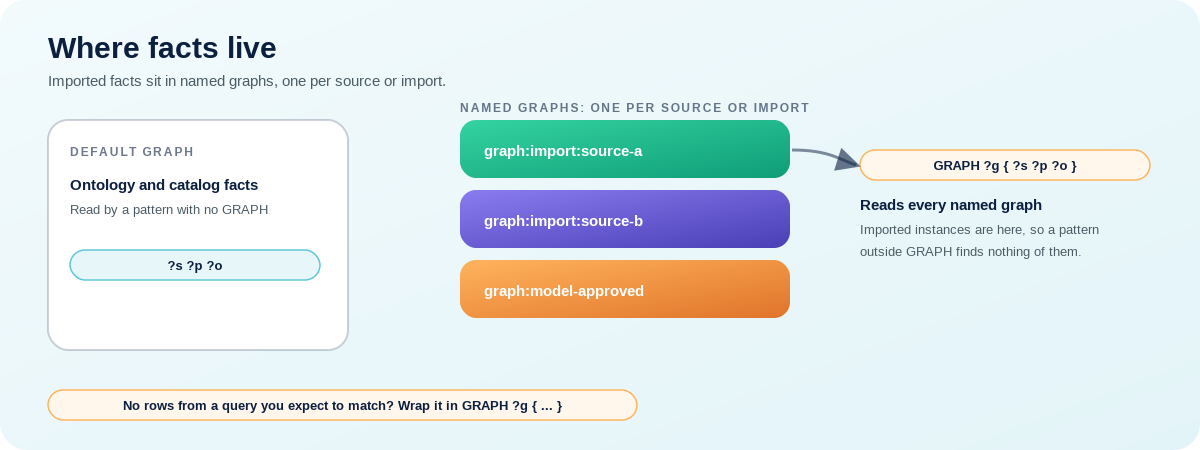
Imported facts live in named graphs, one per source or import. A pattern outside a GRAPH block reads only the default graph. If a query that should find data returns no rows, wrap the pattern:
SELECT ?s ?p ?o WHERE { GRAPH ?g { ?s ?p ?o } } LIMIT 10The names in these examples
Section titled “The names in these examples”The demo’s ontology lives under the namespace https://graph-owl.dev/packs/source-dairy-coop-db#. Classes are MilkLot, QualityTest, Farm, and so on. A property is the class name followed by the column: milkLotLitres, qualityTestValue, farmName. A relation is named the same way: milkLotFarm links a lot to its farm. Find the names for your own data by listing a class’s predicates:
SELECT DISTINCT ?p WHERE { GRAPH ?g { ?s a <https://graph-owl.dev/packs/source-dairy-coop-db#Farm> ; ?p ?o } }Sort and limit
Section titled “Sort and limit”PREFIX d: <https://graph-owl.dev/packs/source-dairy-coop-db#>SELECT ?lot ?litres WHERE { GRAPH ?g { ?lot a d:MilkLot ; d:milkLotLitres ?litres } }ORDER BY DESC(?litres) LIMIT 3The three largest lots: 2,688, 2,651 and 2,614 litres.
Filter
Section titled “Filter”PREFIX d: <https://graph-owl.dev/packs/source-dairy-coop-db#>SELECT ?test ?v WHERE { GRAPH ?g { ?test a d:QualityTest ; d:qualityTestValue ?v . FILTER(?v > 400000) }}One test is above the example limit used in the data: test 27, at 455,500.
Aggregate across a join
Section titled “Aggregate across a join”PREFIX d: <https://graph-owl.dev/packs/source-dairy-coop-db#>SELECT ?farmName (COUNT(?lot) AS ?lots) (SUM(?litres) AS ?total) WHERE { GRAPH ?g { ?lot a d:MilkLot ; d:milkLotLitres ?litres ; d:milkLotFarm ?farm . ?farm d:farmName ?farmName }} GROUP BY ?farmName ORDER BY DESC(?total) LIMIT 3Litres per farm: Farm Fernlea 10,518 across 5 lots, Farm Dunmore 8,656 across 4, Farm Cedar Hill 8,508 across 4.
Optional data
Section titled “Optional data”PREFIX d: <https://graph-owl.dev/packs/source-dairy-coop-db#>SELECT ?lot ?test WHERE { GRAPH ?g { ?lot a d:MilkLot . OPTIONAL { ?test d:qualityTestMilkLot ?lot } } } LIMIT 3OPTIONAL keeps a lot with no test; ?test is simply unbound for it.
Yes or no
Section titled “Yes or no”PREFIX d: <https://graph-owl.dev/packs/source-dairy-coop-db#>ASK { GRAPH ?g { ?t a d:QualityTest ; d:qualityTestValue ?v . FILTER(?v > 400000) } }Returns [{"answer": "true"}].
As of an earlier moment
Section titled “As of an earlier moment”Add "asOf": "<RFC 3339 timestamp>" to the body. See Time travel.
Limits and budget
Section titled “Limits and budget”A query runs inside a budget the server sets, not the caller. truncated: true in the answer means the budget cut the scan short: narrow the query. factsScanned tells you how many facts it read, and plan how the engine decided to read them.
Why POST
Section titled “Why POST”A query is a body, not a URL. The GET form would put queries (which often contain literal values from your data) into request logs and browser history. An operator can allow GET with SPARQL_ALLOW_GET=true for clients that only speak it.
Supported
Section titled “Supported”SPARQL 1.1 query. Federated query and SPARQL 1.2 are not claimed. See Standards.