

MCP overview
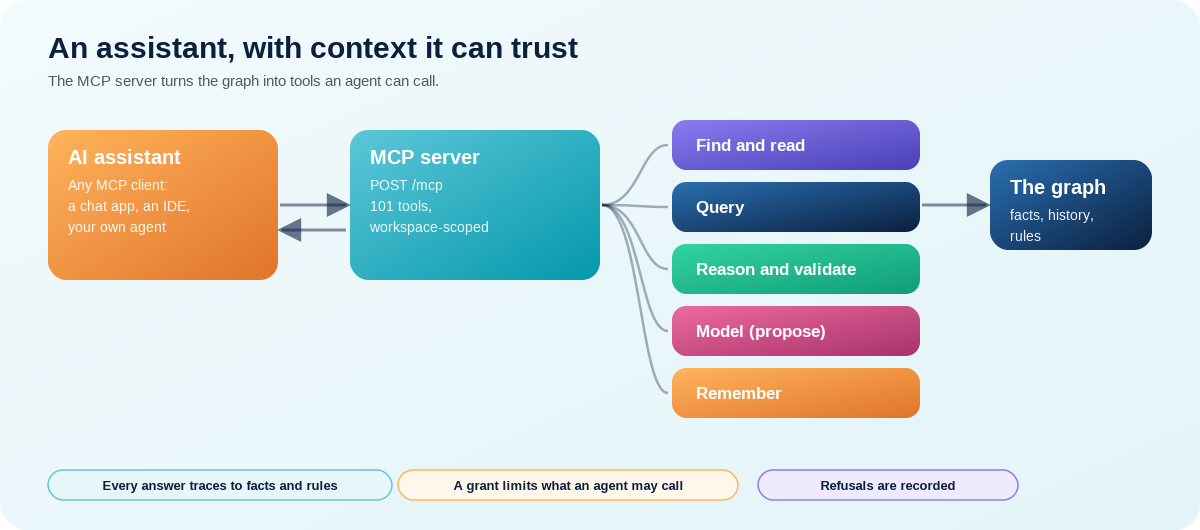
GraphOWL includes an MCP server at POST /mcp. An assistant connects to it and can look up what a term means, follow relationships, run queries, propose changes and record what it learned, with every answer traceable to the facts and rules behind it.
Context is only useful to an agent if it is current, reviewed and attributable. Those are properties of the engine, not of the prompt.
What the tools cover
Section titled “What the tools cover”The server offers 102 tools (full reference; by family), in these families:
| Family | Examples | What an agent can do |
|---|---|---|
| Find and read | search_assets, search_nodes, get_asset_context, traverse |
locate things, read their context, walk relationships |
| Query | query_graph, query_graph_cypher, query_virtual_graph |
ask exactly |
| Reason and validate | run_reasoning, run_validation, explain |
derive, check, and say why |
| Model | propose_terms, propose_relations, propose_axiom, decide_term |
propose changes to the ontology; a person decides |
| Remember | record_memory, recall_memory, record_investigation |
keep knowledge about an asset for the next session |
| Packs and sources | list_packs, register_source, load_source_sample |
work with domain bundles and connect sources |
The rule that matters: agents propose, people decide
Section titled “The rule that matters: agents propose, people decide”Tools that change what the graph claims create proposals. A person approves them. An agent’s grant says which capabilities it may use, and refusals are recorded. See Agent patterns.
Session scope
Section titled “Session scope”A session can be scoped to one workspace, so an assistant working for one team cannot read another’s data. Tools that take a workspace argument say so; in a scoped session it is required.
Transport
Section titled “Transport”JSON-RPC 2.0 over HTTP at POST /mcp; the server reports its capabilities (tools and resources) on initialize. See Connect a client.