

From a database to an ontology
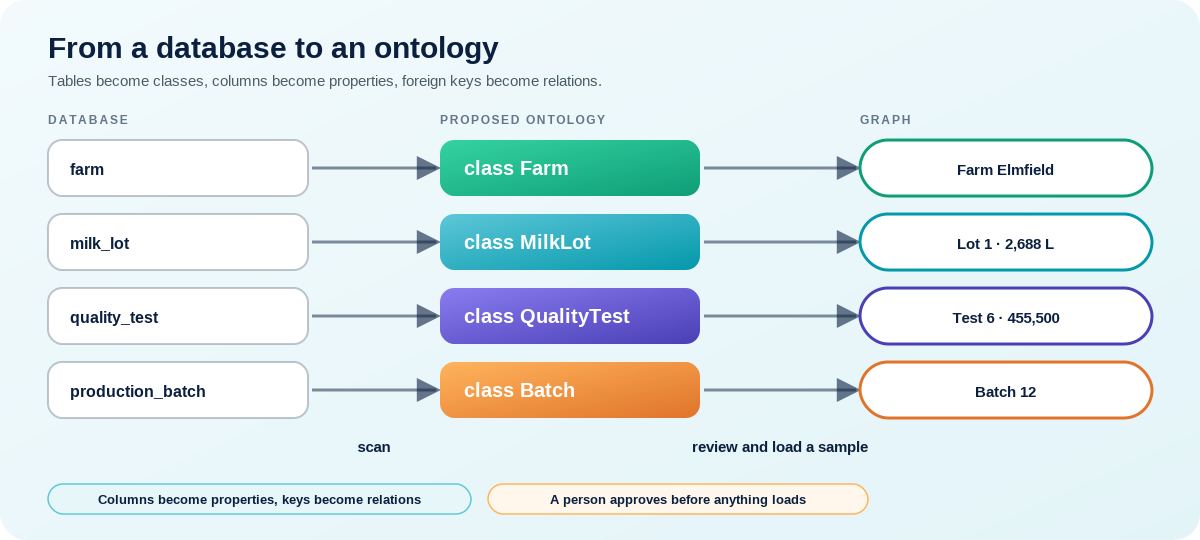
This is the walkthrough behind the demo. It uses a fictional dairy cooperative; the sample database is public.
1. Connect the source, read-only
Section titled “1. Connect the source, read-only”Create a read-only role in your database and connect it as a source. GraphOWL reads the database’s tables, columns and keys. Nothing in the console can change the source.
2. Scan and propose
Section titled “2. Scan and propose”GraphOWL catalogues the schema as assets (tables, columns, keys) and proposes an ontology from it: a class per table, a property per column, a relation per foreign key. For the dairy database that is farms, herds, milk lots, tanker runs, quality tests, batches, retailers and sales.
3. Review
Section titled “3. Review”Open the proposal. Approve, edit or reject each class, relation and rule. Nothing takes effect until a person approves it. Approved terms enter the workspace’s vocabulary.
4. Load a sample
Section titled “4. Load a sample”Load a bounded sample of rows. Each row becomes an instance of an approved class. The demo loads the first rows of each table: enough to explore and to check the model, without copying the whole database.
5. Ask questions
Section titled “5. Ask questions”SELECT ?class (COUNT(?s) AS ?n)WHERE { GRAPH ?g { ?s a ?class } }GROUP BY ?class ORDER BY DESC(?n)Then try openCypher, search, or the MCP server from an assistant.
6. Check coverage
Section titled “6. Check coverage”See how much of the model is documented and how much of it the data reaches. Gaps are the work list for the next review.
What to look for
Section titled “What to look for”- A class with no instances: the sample missed it, or the table is empty.
- A relation with no edges: a foreign key whose values do not match.
- Terms with no definition: the vocabulary needs writing.
Through the API
Section titled “Through the API”Each console step is an operation on a service, the registered name of your source (dairy-coop-db in the demo). The routes below are in the API reference; they run in this order.
| Step | Route | What it does |
|---|---|---|
| Where it stands | GET /services/{service}/status and GET /services/{service}/stages |
the scanned tables and keys, terms by review status, and each set-up stage’s latest state |
| Propose | POST /services/{service}/ontology-proposal |
propose the tables, columns and keys as draft ontology terms in the source’s own pack |
| Look at the data | POST /services/{service}/row-preview, POST /services/{service}/column-profile |
the first rows of a table, and what each column holds (null fraction, distinct count, common values); read-only, administrators |
| Settle open questions | GET and POST /services/{service}/questions |
questions the scan could not settle (a hierarchy, a link, a fixed list); the answer is recorded with the person’s name |
| Candidates for lookup values | GET /services/{service}/vocabulary-candidates |
lookup tables that already contain schemes and concepts |
| Review | the glossary term routes (/glossaries/{id}/terms) and the console |
approve or reject each term; nothing takes effect before |
| Load a sample | POST /services/{service}/sample-loads |
load a bounded sample of rows as instances of the approved classes |
| Put it in a workspace | POST /services/{service}/workspace |
add the source to a workspace you choose: its sample graph, its pack graph and its pack. DELETE takes it off again |
| Check coverage | GET /services/{service}/coverage, GET /services/{service}/metrics |
how many competency questions the sample answers, and the model’s size by kind |
Two properties worth knowing:
- Sample loads need approved terms. If you load before approving, there is nothing to instantiate.
- A source belongs to a workspace you choose. One workspace gathers many sources; do not create a workspace per source.
From an agent, the same flow is register_source, propose_source_ontology, load_source_sample and the review tools. See Tool families.